
What VAM adds – and where to find it
| Area | What it is | Where it starts | Chapter |
|---|---|---|---|
| Progression | 100 levels (admins: 60 to 900), level gifts, attribute perks at 30 and 40, Ouroboros cycles | Shift+P › Rewards, Ouroboros | Progression |
| Inspiration | Points for everything new you find or kill, spent on card boosters and a deck | Shift+P › Inspiration | Progression |
| Valkyrian Tokens | The mod's reward currency, next to the normal coins | Shift+P › Shop, Bounty Board | Progression |
| Professions | Miner, Woodsman, Hunter, Smith, Provisioner and Builder rise by doing the work | Shift+P › Professions | Professions and Crafting |
| Crafting | Crafting quality, VAM workbenches, alchemy, runes, accessories, arsenals | Talent window, stations | Professions and Crafting |
| World | Valkyries, ancient bosses, the Bounty Board, the Auction House, mail, Heartstones, festivals | In the world | The World |
| Followers | Thrall drill, breeding, golems, micropets | Follower window, stations | Thralls and Animals |
| Clans | Clan treasury, diplomacy, territories, war | Clan window | Clans and Territories |
| Servers | Every number on one admin page, with presets | Shift+P › Admin | For Admins |
Installing VAM
ステップ 2/3 · 管理者
Single player
- Subscribe to VAM 2.0 on the Steam Workshop.
- Start Conan Exiles Enhanced and turn the mod on in the game's mod list.
- Start or load your game.
On a server
- Players: join the server from the server list. The game downloads the mod for you.
- Admins: add Workshop ID 3809527607 to the server's mod list. Everything else is set in the game, on the Admin page (see For Admins).
Good to know before you start
- VAM needs no other mod. Everything happens in the game itself.
- It works on the Exiled Lands and on the Isle of Siptah.
- Client and server need the same version. If you get "Mod Mismatch" or the mod stays old: unsubscribe, wait until the mod folder is empty, subscribe again and restart the game.
- VAM uses the mod folder name
Valkyrian_Lands. A mod that uses the same folder name – for example the current Wings of Valhalla file – cannot be loaded together with VAM. Pick one. - Next to other mods: VAM changes only three small vanilla files (two ore materials and the inventory tile). Mods that replace the interface go before content mods in the load order. If something breaks, halve your mod list and test again.
- Always back up your server or single-player save before you update. When an update has to change saved data, the update notes say so at the top.
Coming from the original VAM or from VAM_Storage
- VAM 2.0 is a new Workshop item (ID 3809527607) for Conan Exiles Enhanced. The original VAM was built for the old game engine; mods from that time do not load in Enhanced without being rebuilt.
- One mod. VAM 2.0 takes over the themed storage chests and the other systems of VAM_Storage. You only need VAM 2.0 – unsubscribe from the old VAM and from VAM_Storage.
- Your old world: carrying an old world over has not been tested. Chests, items and buildings from the old mods may be missing. Keep a backup, or start a new world.
- What is gone on purpose: the old hub and its portals, the old VAM map parts and the old 600-level curve. Heartstones now take you home (see The World), and the experience of the old levels fits into 100 levels (see Progression).
Your first login
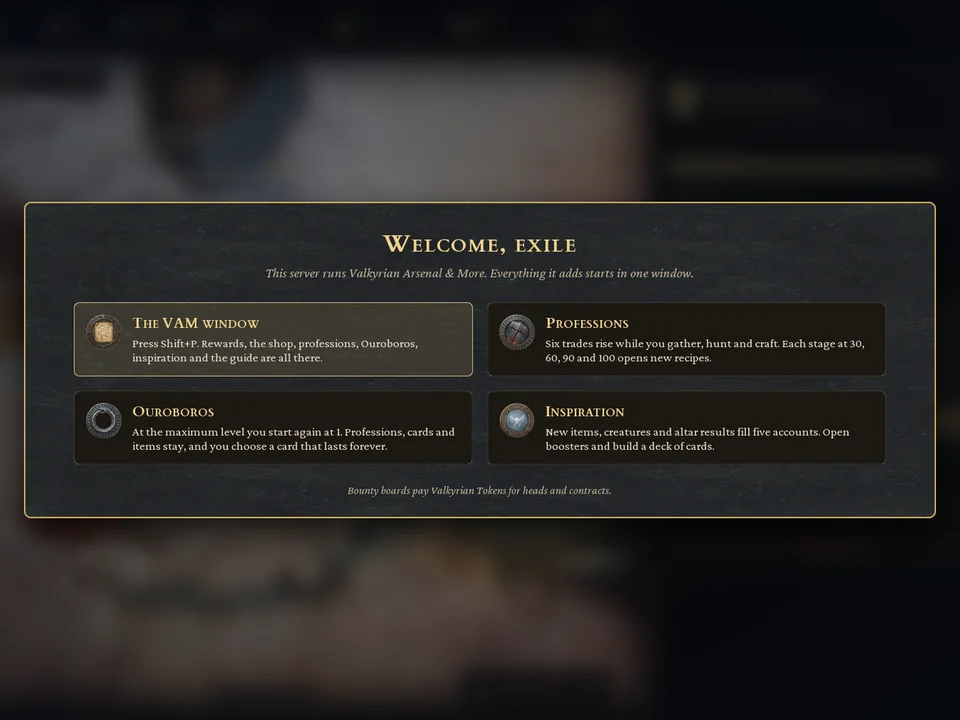
The welcome window. A new character sees the VAM welcome window once, at the first login. It says "Welcome, exile" and has short cards about the VAM window, professions, Ouroboros and inspiration, and a line about the Bounty Board.
- Open the Guide [G] opens the guide in the Shift+P window.
- Close [Esc] closes the window.
If the server admin switched the welcome window off, you only get a short note to press Shift+P.
What's new. After each VAM update, a character that already existed before the update sees a "What's new" panel once, with the three main changes of that version. A new character sees only the welcome window. You can read the full notes any time at the top of the Guide (Shift+P › Guide); notes of older versions collect there under "Earlier versions". The server admin can switch the panel off – the notes in the Guide stay.
The Shift+P window
Press Shift+P to open the VAM window. Across the top runs a row of medallions; point at one to see its name. From left to right:
| Medallion | What you do there |
|---|---|
| Rewards | Claim your level gifts. A path shows every gift, your next reward and the best rewards ahead. Claimed gifts go straight into your backpack. |
| Shop | The profession shop. You pay with Valkyrian Tokens. |
| Professions | Your six professions, their XP and an arrow per profession (Rising, Held, Lowering). |
| Inspiration | Spend inspiration points on card boosters and build your deck. |
| Ouroboros | At the maximum level, complete a cycle and choose a card that lasts forever. |
| Rankings | Weekly, monthly and yearly server rankings. |
| Festival tab | Only while a festival runs – for example The Thirty-One Candles during The Unchosen Nights. |
| Admin | Only server admins see it. |
| Guide | Short guide topics and "What's new". |
Also in the window:
- The coin bar shows your gold, silver, bronze and Valkyrian Tokens.
- The footer shows your progress and holds the HUD button (see below).
- On the Rewards page you can also use the keyboard or a gamepad: ↑ and ↓ move along the list, Enter claims.
The VAM HUD
VAM paints its own HUD on top of the game. It is on by default:
- Sun arc (top right): time of day, sun and moon, and the weather.
- Server panel below it: players online and your ping.
- Contract card: your current bounty contract.
- Purse ticker: coins and Valkyrian Tokens you just received.
- Raid warning: "Her sisters ride for you – A Valkyrie war band is coming" (see The World).
- Vitals in one of two looks, Valkyrie Shield or Bronze & Blood, or the vanilla look.
- HUD line: the progress line above the hotbar.
- XP popups: short notes with the profession XP you just earned.
Switch it the way you like. Open Shift+P and click HUD in the footer. A panel opens:
| Switch | What it does |
|---|---|
| VAM HUD: On / Off (Funcom HUD) | The first entry. Off hides every part of the VAM HUD and leaves Funcom's HUD exactly as without the mod. Your other switches keep their values; On brings them back. |
| HUD line, XP popups | On or off. |
| Sun arc, Server, Contract, Purse, Raid warning | On or off, each on its own. |
| Vitals style | Valkyrie Shield → Bronze & Blood → Vanilla. |
| Show vitals | Always, or When needed (greyed out under Vanilla). |
Your choice is kept after a relog and a server restart. The way back is always there, because the panel sits in the Shift+P window, not in the HUD itself.
Your first hour – step by step
- Press Shift+P and look around. Open the Guide medallion for the short version of every topic.
- Gather as usual. Every hit earns profession XP for the right profession: stone, ore and ice for Miner; trees, wood and bark for Woodsman; plants, bones, feathers and shells for Provisioner; every wild animal you kill for Hunter. XP popups show what you earned. (Details in Professions and Crafting.)
- Pick up something new. The first piece of an item that reaches your backpack earns an inspiration point – and so do the 10th, 100th and 1,000th, as far as the item's stack size allows. The first kill of each kind of enemy counts too. (See Progression.)
- Keep the heads. Heads of slain beasts and bosses pay Valkyrian Tokens at a Bounty Board: ordinary beasts 1, kings and alphas 3, bosses 5. On the Exiled Lands one stands in Sepermeru, in front of the south gate. The Isle of Siptah has no fixed board – there your admin sets one up.
- Reach level 10 and claim your first gift. Open Shift+P › Rewards and click Claim. At level 10 you get a Heartstone and 5 Valkyrian Tokens.
- Use the Heartstone at home first. The first use binds the stone to the spot where you stand. Every later use brings you back there; after each journey the stone needs 30 minutes to recover. The Heartstone works ten times.
- Look at the first VAM talents in the talent window, for example:
- Alchemy (level 10): the Alchemist's Cauldron.
- Backpacks: Small Pouch (level 10): a pouch for the Back slot, +25 carry capacity.
- Torch Bracelets (level 17): light that leaves both hands free.
Stacks are bigger. On a standard VAM server every item that stacks holds ten times its normal stack. Admins can change this.
Your first day
- Level gifts keep coming. There are 27 on the way to level 100; 13 of them add Valkyrian Tokens on top. The next ones are at level 15, 20, 25 and 30. (Full list in Progression.)
- Profession stages. At profession level 30, 60, 90 and 100 each profession opens new recipes, pays tokens and gives a lasting bonus.
- Spend your tokens in Shift+P › Shop. Articles of your own profession get cheaper with every stage you hold.
- Mind the Valkyries. They live in camps among the vanilla factions, on both maps. If you are level 30 or higher and kill a Valkyrie priestess at Ymir's shrines, her sisters may come for you: a war band of 2 to 4 Valkyries, sometimes led by a Primarch. The raid warning on your HUD tells you when.
- There are no portals. The old hub is gone. Heartstones take you home; for routes your clan shares, build Transportory Stones as in the base game.
Tips
- Claim gifts with room in your backpack. If it is full, the gift is not lost: you get a message and it stays ready to claim.
- The guide in Shift+P is short. This guide is the long version.
- Server admins open the Admin page with Make Me Admin in the game settings and the admin password, then Shift+P again (see For Admins).
Common mistakes
| Mistake | What happens | What to do |
|---|---|---|
| Using the Heartstone for the first time far from home | It binds to that spot. | Use it first where you want to return. |
| Mining gold veins for gold | In VAM gold veins give silverstone, on purpose. | Goldstone comes from Gold Mines on territories (see Clans and Territories). |
| Placing building pieces for Builder XP | Placing gives no Builder XP. | Builder XP comes from crafting at stations (see Professions and Crafting). |
| Running VAM next to VAM_Storage or the old VAM | The old mods do not load in Enhanced. | Use only VAM 2.0. |
| "Mod Mismatch" when joining a server | Client and server versions differ. | Unsubscribe, wait until the folder is empty, subscribe again, restart. |
Related chapters
- Progression – levels, level gifts, attribute perks, inspiration, tokens, Ouroboros
- Professions and Crafting – the six professions and everything you build
- The World – Valkyries, bosses, bounties, trade, travel, festivals
- For Admins – installing on a server, the Admin page
- FAQ and Troubleshooting