

Step 1 of 3 · Admins
Installing on a server
- Add Workshop ID 3809527607 to the server's mod list. VAM needs no other mod.
- Start the server once; players get the mod from the Workshop when they join.
- Client and server need the same version. "Mod Mismatch" or an old mod: unsubscribe, wait until the mod folder is empty, subscribe again and restart the game.
Next to other mods
- VAM uses the mod folder name
Valkyrian_Lands; a mod with the same folder name (for example the current Wings of Valhalla file) cannot run together with it. - VAM changes only three small vanilla files (two ore materials and the inventory tile).
- Load order: interface mods before content mods. Mods below VAM in the list override VAM where both change the same thing. The maximum level is the exception: VAM keeps its own value from the LEVELS page and sets another mod's maximum back within about half a minute. If something breaks, halve the list and test.
Before every update
- Back up your server save. When an update has to change saved data, the update notes say so at the top.
- Update the server and the players at the same time.
Opening the Admin page
- In the game settings click Make Me Admin and enter the admin password. (Console:
MakeMeAdmin <password>; in single player without a password.) - Open the VAM window again with Shift+P.
- The Admin page is the second medallion from the right in the top row; point at a medallion to see its name.
- Only admins see the Admin page.
- The console command
dc vamopens the Shift+P window directly on the Admin page (admins only). While a festival runs and today's gift is still waiting, it opens the festival tab first. - Admin rights from Make Me Admin last only until you log out – after you log in again, repeat it. MakeMeAdmin sent through RCON reports success but does not give you the Admin page – do it in the game.
- Every page says: Settings are saved on the server and apply right away.
The pages (SERVER SETTINGS)
| Page | What you set there |
|---|---|
| Overview | The main switches and factors of the mod |
| Crafting Quality | How often each quality tier rolls and how strong it makes an item |
| Elder Forge | The tier chances and ranges of elder items |
| Blacklist | Items that never roll a quality tier |
| Bounty Board | Which bounty lists run, your own bounties and shop wares |
| VAM 2.0 Systems | Every other number, on ten tabs, with presets |
| Help | How the server systems work, and where to report bugs |
Overview
The main switches – The main switches of the mod - settings are saved on the server and apply right away.
Crafting & Drops
- Crafting quality – crafted gear rolls a quality tier.
- Token of Death drops (ignores token cap) and Token drop chance (standard off, 5 %). A Token of Death from a kill by you or your following followers now goes straight into your backpack and is no longer lost when the corpse is harvested.
- Rune drops, Essence drops, Tome drops and Rune, essence and tome drop chance (standard 10 %: 10 = normal, 20 = double, 0 = off). Rune drops off now really works, without a restart.
Progression
- Level rewards, Rebirth (Ouroboros) (on by default; the Ouroboros tab and cycles at the maximum level), Professions, Profession XP (100 % = default), Inspiration system, Follower XP (100 % = vanilla).
World & Economy
- Breeding time (100 % = vanilla) – new in this version: it really works now, without a restart. If you changed it before, your players feel it for the first time after the update.
- Rewards tab – switches the Rewards tab of the Shift+P window.
Crafting Benches
- Bench speed (basic) ×4.0, Bench speed (advanced) ×6.67, Bench yield (basic) ×1.0, Bench yield (advanced) ×1.5.
- Bench factors apply to benches built afterwards and to all after a restart.
- Advanced benches give the recipe amount for single pieces and dismantlable items; materials, potions, food and arrows keep the yield factor.
Crafting Quality
How often each quality tier rolls, and how strong it makes a crafted item.
- How often: set the chances for Common, Uncommon, Rare and Epic; Junk gets what is left to 100 %. Standard: Junk 40, Common 40, Uncommon 15, Rare 4, Epic 1 %.
- How strong: the stat range of each tier.
- Click Apply changes. New chances count from the next craft, new ranges after the next server restart.
- Also part of every roll: the crafter's Expertise, a thrall at the station (+5 % per tier) and the Blacklist.
- On VAM 2.0 Systems › Crafting: Junk on vanilla recipes (standard off) and Junk below item tier (standard 4 – arsenal, reforged and elder gear roll like vanilla).
Elder Forge
Elder items roll a tier when crafted – the tier decides where their stats land. Set How often, How strong and see the Result per tier. Standard chances 75 / 14 / 6 / 3.5 / 1.5 %. Changes apply to elder items crafted from now on; items that exist keep their stats.
Blacklist
Crafting Blacklist – Items on this list never roll a quality tier when crafted. Pick items from your own inventory and move them with Exclude / Include. The item is still crafted normally; it only gets no quality roll. In this version there is no page to forbid items or recipes.
Bounty Board
Which bounty lists run on this server, and your own bounties and shop wares.
- Bounty lists – Vanilla Bounty and VAM Bounty.
- Add a bounty – Item ID (or Head ID), XP, Tokens, Category, then Add. Tokens and IDs must be whole numbers above 0, otherwise: Bounty not added: item ID and tokens must be whole numbers above 0.
- Add a shop ware – Item ID, Rank, Price, Quantity – and the Bounty Shop list.
- New in this version: Add works without Enter, heads can be removed by ID, and new or re-added heads carry valid rewards. Players can hand in heads again after you changed the list.
VAM 2.0 Systems
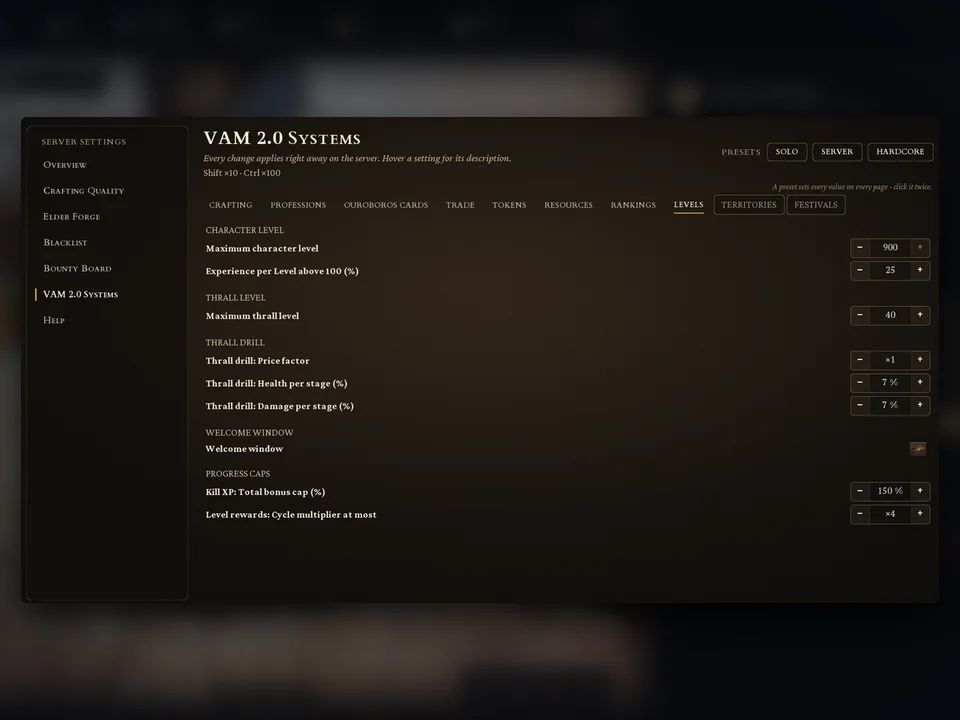
Every change applies right away on the server. Hover a setting for its description. Hold Shift for steps of 10, Ctrl for steps of 100.
Tabs: CRAFTING · PROFESSIONS · OUROBOROS CARDS · TRADE · TOKENS · RESOURCES · RANKINGS · LEVELS · TERRITORIES · FESTIVALS.
Presets. SOLO, SERVER and HARDCORE. A preset sets every value on every page – click it twice. SERVER is the standard. Presets never change the maximum level, the thrall maximum, the experience above level 100, the storage range, the market currency, the rankings, the festival day change, or the festival and territory test settings.
| Example | Solo | Server | Hardcore |
|---|---|---|---|
| Profession level pool | 600 | 250 | 200 |
| Attribute maximum | 40 | 40 | 30 |
| Shop price factor | ×1.5 | ×3.0 | ×5.0 |
| Kill XP: total bonus cap | 250 % | 150 % | 100 % |
LEVELS
| Setting | Standard | Range | Note |
|---|---|---|---|
| Maximum character level | 100 | 60–900 | The Ouroboros cycle and the level gifts move with it (at 60: gifts at levels 6–60, at 900: 90–900). Above 100 each level gives 1 knowledge point (the talent points players spend on talents), no attribute points. After a restart; characters above a lowered maximum keep their level. |
| Experience per Level above 100 (%) | 100 % (= 2.5 million per level) | 10–100 | Lower it for a high maximum: suggested 50 % at level 300, 25 % at level 900. After a restart. |
| Maximum thrall level | 40 | 20–100 | Perks at 10, 15, 20, 30, 35, 40. After a restart. |
| Thrall drill: price factor / health / damage per stage | ×1 / 7 % / 7 % | ||
| Welcome window | on | ||
| What's New window | on | Shows the new features once after each VAM update. Players can read them any time in the Guide. | |
| Kill XP: total bonus cap (%) | 150 % | ||
| Level rewards: cycle multiplier at most | ×4 |
Experience for one cycle
| Maximum level | Experience per level above 100 | Experience to reach the maximum | Knowledge points in all |
|---|---|---|---|
| 100 | – | 59.5 million | 1,337 |
| 300 | 50 % | 310.9 million | 1,537 |
| 900 | 25 % | 561.6 million | 2,137 |
| 900 | 100 % | about 2.06 billion | 2,137 |
Inspiration booster tiers, milestone cards and the proportional knowledge points follow the maximum level.
The other tabs – most important standards
| Tab | Setting | Standard |
|---|---|---|
| CRAFTING | Craft and build from storage (m) | 0 = server setting (40 m); only values above 40 work; PvP building keeps the server setting |
| PROFESSIONS | Profession level pool · Only one master profession · Attribute maximum · Attribute books: points per level | 250 · on · 40 · 2.4 |
| PROFESSIONS | Profession experience popups · Profession reserve at most (XP) | on (players can switch them off) · 5,000 |
| OUROBOROS CARDS | Same card at most · Cards per offer · Card reroll | 3 · 3 · 25 tokens, the second doubled, 2 per cycle |
| OUROBOROS CARDS | Ring bonus per cycle · Milestone card strength | 10 % · 50 % |
| TRADE (AUCTION HOUSE) | Fee on sales · Offers per seller · Offer duration · Minimum bid · Minimum raise | 5 % · 20 · 7 days · 50 % · 5 % |
| TRADE | Alliances per clan · Officers' daily treasury share · War declaration | 3 · 25 % · 20 S + 2 S per enemy member, at most 200 S, 48 h cooldown |
| TRADE | Market currency (item ID) | 0 = coins |
| TOKENS | Profession shop · Shop price factor · Discount per stage | on · ×3 · 10 % |
| TOKENS | Bounty Board open · Bounty tokens per day · Contract lock per target · XP potion | on · 400 · 12 h · 50 % |
| TOKENS | Tokens per profession stage · Announce Ancients | 10 × stage · on |
| RESOURCES | Stack size multiplier | ×10 (all stackable items, also of other mods; after a restart) |
| RESOURCES | Valkyrie Sets: duplicates before a missing set | 3 |
| RESOURCES | Valkyrie raid | on, 50 % per priestess kill, 45 min cooldown, 2–4 Valkyries, 10 % led by a Primarch, from player level 30 |
| RESOURCES | Pools of the Ancients | on |
| RANKINGS | Categories NPC kills, Time played, Ancients and bosses, Bounties, Profession XP · weekly, monthly, yearly · Leave admins out | on · on · on |
| TERRITORIES | Costs, limits and deadlines of the territories | see Clans and Territories |
| FESTIVALS | see below |
Rankings. Weekly reset on Monday, monthly on the 1st; places 1–3 get their prize by mail if you set one in the Rankings tab of the Shift+P window.
FESTIVALS
| Setting | Standard |
|---|---|
| All Festivals | on |
| The Unchosen Nights (Halloween) | 1 (0 = off, 1 = by calendar 31 Oct – 30 Nov, 2 = always on) |
| Unchosen Nights: Gifts and Decor Only | off |
| Ymir's Long Night (Christmas) | 1 (1 Dec – 6 Jan) |
| The Turning of the Year (New Year) | 1 (31 Dec – 1 Jan) |
| Festival Day Change (hours from UTC) | 0 – for servers outside Europe (−12 to 14) |
| Festival Icon in the HUD | on |
| Test: Start a Festival Now | 0 |
Market stalls and bounty boards
New in this version: players can no longer build market stalls or bounty boards – admins place them.
- Spawn the item: Market Stall
827401or Bounty Board91010045(also on the Isle of Siptah). - Place it like a building piece. Stalls and boards take no damage and do not decay.
- To remove your own, hold E and choose Return to Inventory (stall) or Dismantle.
Stalls and boards your players built earlier stay; unplaced ones can still be placed.
Equivocus Wings exist only as an admin spawn (item 90999358).
Recommended settings
- There is no official recommended XP setting. VAM's balance assumes the game's default XP multipliers (1.0): levels 1 to 60 need about 1.3 times the vanilla experience, level 100 about 59.5 million in all.
- Want faster or slower levelling? Change the game's own XP multipliers in the server settings. VAM's own values come on top – for example Kill XP: total bonus cap or Profession XP.
- For a high maximum level, lower Experience per Level above 100 (%) – 50 % at level 300, 25 % at level 900 – or a cycle is out of reach.
- Start from a preset (SOLO for single player and small groups, SERVER, HARDCORE) and change single values afterwards.
Takes effect only after a server restart: maximum level, experience above 100, thrall maximum, stack size, lowering the storage range, bench factors for benches that already stand, the ranges on the Crafting Quality page.
RCON and console
- VAM's own console command is
dc vam(opens the Admin page). - Vanilla RCON (
con <index> <command>) runs console commands as a player, for exampleSpawnItemorTeleportPlayer. MakeMeAdmin through RCON does not open the Admin page. - The RCON bridge of VAM_Storage is not part of VAM 2.0.
Reporting bugs
Report on vam.valkyriangaming.com/report or on the VAM Discord. It helps a lot if you say: what happened, how it can be reproduced, and which other mods you run. Screenshots and log files help.
Tips
- Change one thing at a time and watch your players' feedback.
- Before an update, read the update notes – they name what changes on existing servers.
- Admins are left out of the rankings by default; switch that off only for a test.
Common mistakes
| Mistake | What happens | What to do |
|---|---|---|
| Looking for a "VAM 2.0" tab in the server settings | It is not there. | Shift+P › Admin › VAM 2.0 Systems. |
| Setting the maximum level to 900 at 100 % XP | A cycle needs about 2 billion experience. | Lower Experience per Level above 100. |
| Expecting a restart-free change of the maximum level | It waits for the restart. | Restart the server. |
| Using MakeMeAdmin through RCON | No Admin page. | Do it in the game. |
| Running VAM with a mod of the same folder name | Mod Mismatch. | Pick one. |
Related chapters
- Getting Started – installing for players
- Progression – what the level and Ouroboros settings mean for players
- Clans and Territories – the territory rules your TERRITORIES tab sets
- FAQ and Troubleshooting